Reward coupons
A reward coupon from the fabric shop Bargello.cz can activate time-limited Premium access in QuiltCat. Enter the code from your purchase confirmation directly in the app. Access duration depends on the purchase value; the app shows the specific end date after accepting the coupon.
Availability
This feature is currently available only to users in Czechia and Slovakia who are customers of the fabric shop Bargello.cz.
Open the form
Choose Redeem coupon in the main Settings menu. The item appears only when this option is available. An internet connection is required to verify the code.
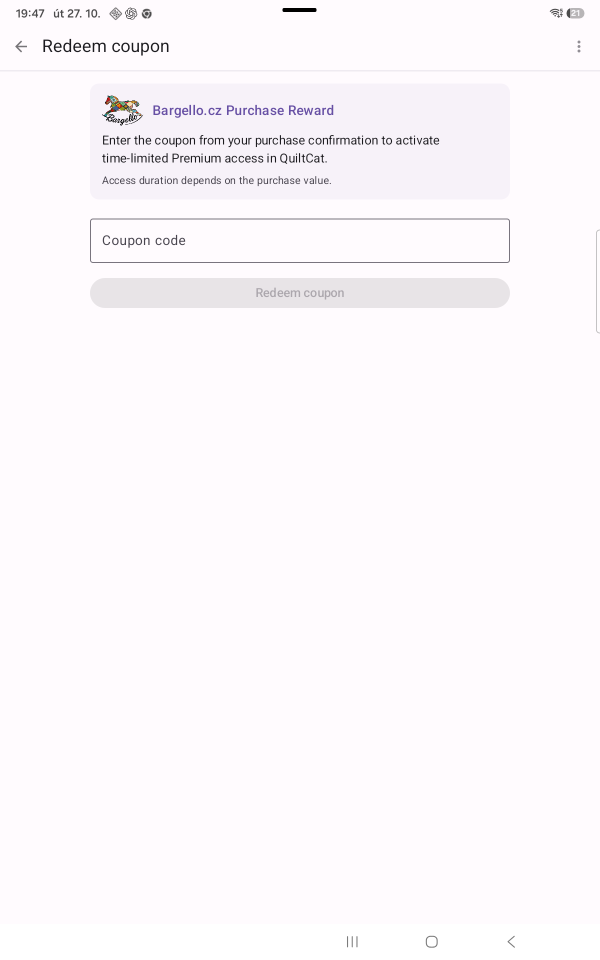
Enter and redeem a code
- Type or paste the code from your purchase confirmation into Coupon code.
- Tap Redeem coupon.
- Wait for the result below the form. While verification is running, you cannot change the code or submit it again.
Letter case does not matter; spaces and hyphens are ignored during verification. Check the other letters and digits against the code you received. An empty field cannot be submitted.
Accepted coupon and access end date
After success, Coupon accepted. Premium is active until… appears with the access end date. Use this confirmation to check the result; entering the code alone does not activate it.
Coupon access is not a Google Play subscription purchase, so it may not create a purchase card on the Premium screen.
If redemption fails
| Message | What to do |
|---|---|
| The coupon code is not valid | Check the letters and digits and that you entered the whole code. |
| This coupon has expired | The code's validity has ended. Check the information supplied with it. |
| This coupon was already used | The code cannot be redeemed again. If you just used it, refer to the acceptance confirmation. |
| Network error | Check your internet connection and try submitting later. |
| You need to sign in | Access verification failed. Reopen the screen; if the message persists, send its wording to support. |
| Could not redeem the coupon | Try later. For a repeated problem, note the message and your QuiltCat version for support. |
Editing the code clears the previous message. A new result appears after submitting again.