Premium and subscriptions
The QuiltCat Premium screen shows benefits, available subscription offers and purchases recognized by the app. Always read the current price and terms in the specific offer and the Google Play purchase dialog.
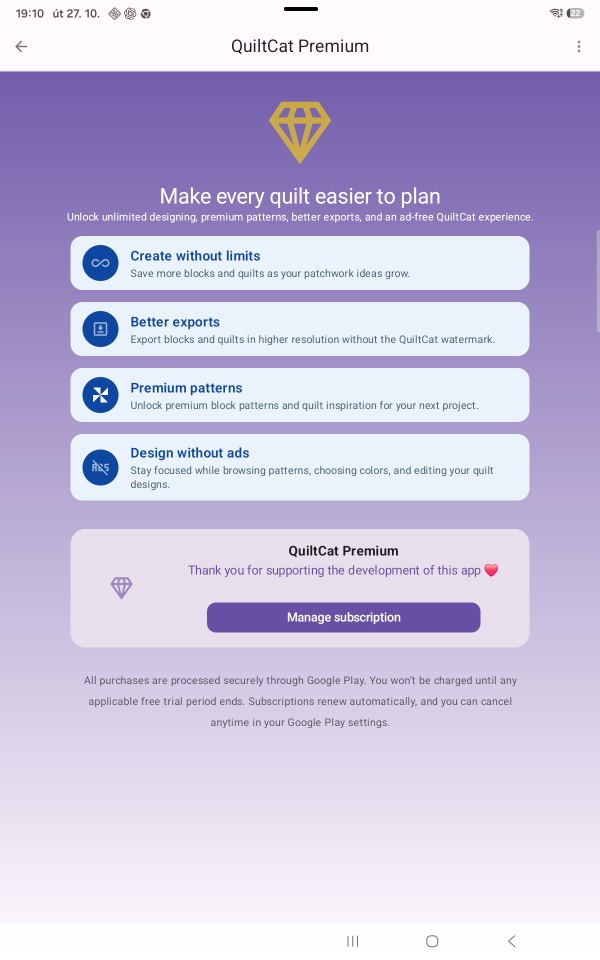
Open Premium offers
Choose Subscription in the main Settings menu. A Premium prompt shown for a locked feature or a reached limit can also take you to this screen.
Scroll down: offers and recognized purchases appear below the benefits. The layout adapts to phones and tablets.
What Premium offers
The in-app overview describes benefits for saving your own blocks and quilts, image exports, premium blocks and working without ads. For a particular locked feature or limit, follow the explanation shown when you try to use it.
Check available features and limits in your installed app, especially if you use an older QuiltCat version.
Choose an offer
Each offer card shows its plan, price and billing period. Depending on availability, you may see Premium Yearly, Premium Monthly, or only one option. Trial information appears only for an offer that includes a trial.
Compare prices together with their stated billing periods. If the app already recognizes a purchase of the current Premium subscription, offers to buy it again may be hidden.
Complete a purchase
- Tap Subscribe on your chosen offer.
- The Google Play purchase dialog opens. Check the selected plan, price, billing period and any trial terms.
- If you want to proceed, complete the confirmation in Google Play, then return to QuiltCat.
A message saying the purchase has started does not confirm it has completed. Wait for the result of a pending purchase; if an error occurs, follow the displayed message. The app processes the change after receiving information from Google Play.
Recognized purchases and management
When the app loads your purchases, their cards appear below the offers. The Manage subscription button on a card opens Google's external subscription-management page; continue there.
Opening this screen loads offers and previous purchases again. If a just-completed purchase has not appeared yet, leave the screen and reopen it after a short wait.
Turn off automatic renewal
To stop your subscription renewing for another period, cancel its renewal in Google Play. Use the Google Account that made the purchase.
- Open Google Play subscriptions.
- Select your QuiltCat subscription and choose Manage if that option appears.
- Choose Cancel subscription and complete the confirmation as instructed by Google Play.
- Check the cancellation confirmation and the date your access ends.
On a phone, you can also start in the Google Play app under Subscriptions, select QuiltCat and choose Cancel subscription.
For a regular paid subscription, access continues for the time you have already paid for; the next period will not renew. Check the exact date in your subscription details. Uninstalling QuiltCat does not cancel the subscription. See the official Google Play instructions for details.
Premium from a reward coupon
A valid reward coupon can also provide Premium access. If you have one, use the separate Redeem coupon item in Settings, when available.
A coupon is not a Google Play purchase. Access granted by a coupon may therefore have no purchase card or subscription-management button on this screen.
Reward coupons are currently available only to users in Czechia and Slovakia who are customers of Bargello.cz. See Reward coupons for the steps and results.
If offers or access do not load
- Check your internet connection and reopen the screen.
- For a previous purchase, check that Google Play is using the account that made it.
- If offers are missing, first check whether the screen already shows your purchase. An empty offer list alone does not mean your access has expired.
- If an error appears, note its wording and your QuiltCat version when contacting support.